Connect Your Microsoft Tenant
Connect Your Microsoft 365 Tenant
To get started with YourCloudServer's management and support services, you need to connect your Microsoft 365 tenant to our partner portal. This connection allows us to manage your environment, deploy devices, and provide support.
Steps to Connect Your Tenant
- Invite YourCloudServer as an external user to your Microsoft Entra (Azure AD) tenant.
- Ensure you have the necessary permissions (Global Administrator) to perform this action.
- Follow the detailed steps below:
- Go to the Microsoft Entra Admin Portal.
- Sign in with your Microsoft 365 Global Administrator account.
- Click Users from the left-hand menu.
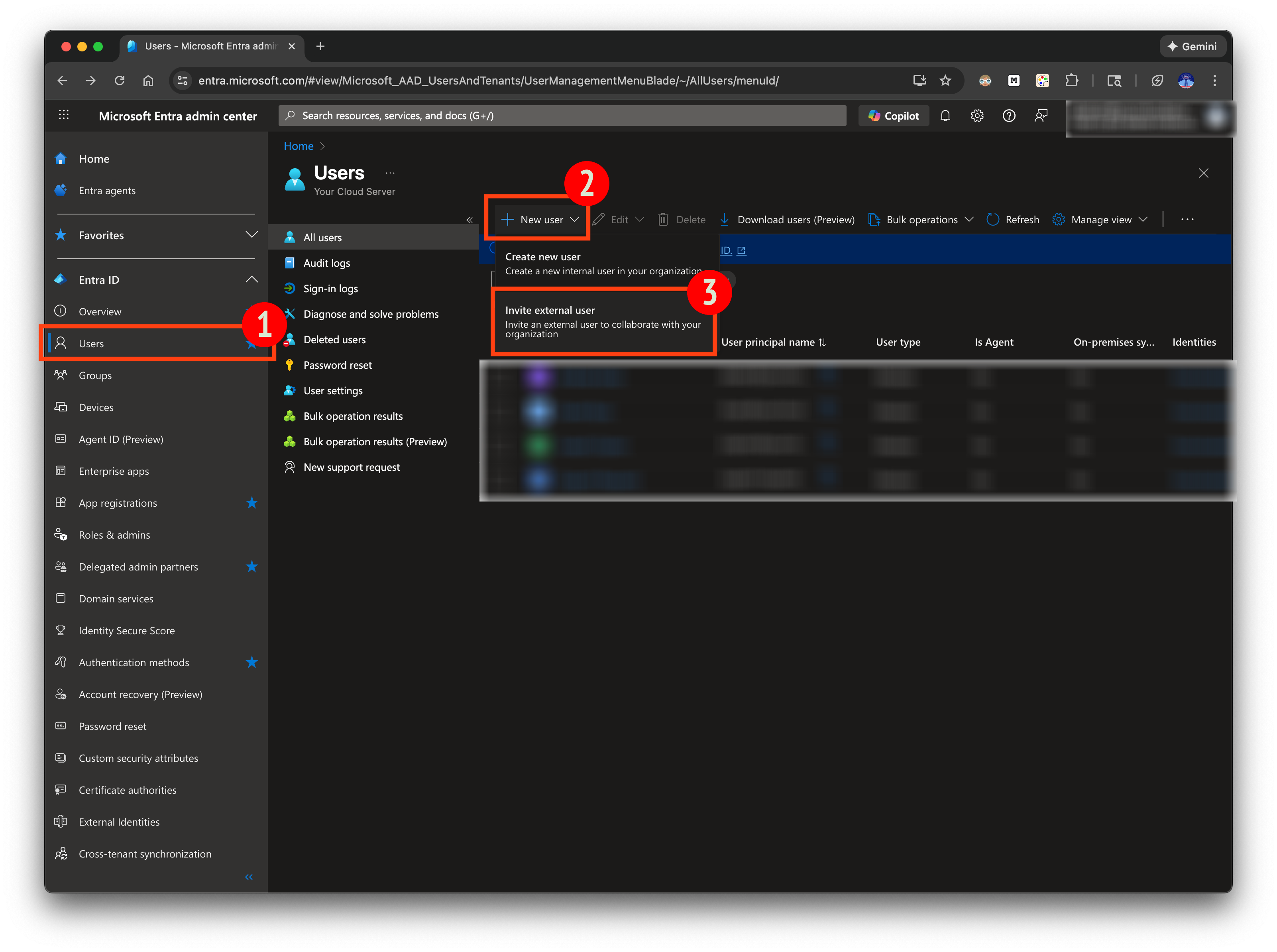
- Click New user.
- Select Invite External User.
- Enter the following details:
- Email Address: support@yourcloudserver.com
- Display name: Technical Support - Your Cloud Server
🔄 Connection Completed
Once accepted:
✔ Your tenant is now connected
✔ We can begin configuring services
✔ We can deploy devices and policies
✔ You gain access to our full support offerings
If you have any questions about permissions, please reach out.